Advertisement
Advertisement
Planet Clicker













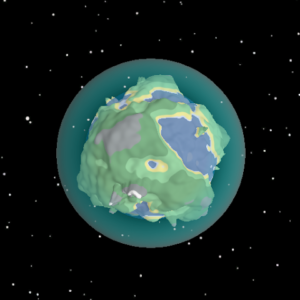
Play Planet Clicker online for free and embark on a fun space adventure! Imagine traveling to different planets, clicking to collect stars, and discovering new worlds.
It’s easy to play and super exciting! You can challenge your friends to see who can collect the most stars. Each click brings you closer to becoming a space hero. So, get ready to explore the universe, make new discoveries, and have a blast with this awesome game.
Are you ready for a cosmic adventure? Let’s start clicking and have fun!
What Is Planet Clicker?
Planet Clicker is an exciting and interactive game developed by FunGames Studio. Released in 2021, it quickly became a favorite among kids who love exploring and learning about planets. In the game, players can click on different planets to earn points and unlock new levels. It’s a fun way to learn about our solar system while playing a game.
The game features colorful graphics, engaging sound effects, and easy-to-use controls, making it perfect for young players. As you progress, you’ll discover interesting facts about each planet, making it both educational and entertaining. Whether you’re a budding astronaut or just curious about space, this game offers endless fun and learning opportunities!
Planet Clicker Gameplay Mechanics
In this exciting game, players start with a small planet that they can grow by clicking on it. Each click earns points, which can be used to upgrade the planet and unlock new features. As you click, you’ll gather resources like energy and minerals. These resources are essential for building structures and upgrading technology to make your planet even more powerful.
Players can also hire virtual workers to automate the clicking process, allowing the planet to grow even when they’re not actively playing. As you progress, you’ll discover new planets with unique characteristics and challenges. Each new planet offers different resources and opportunities to expand your cosmic empire.
The game features various achievements and milestones that reward players with bonuses, encouraging them to keep clicking and exploring. Special events and challenges pop up regularly, offering limited-time rewards for those who participate.
With colorful graphics and simple controls, this game is easy to play but offers depth for those who want to strategize their growth. Players can compete with friends or other players around the world to see who can build the most impressive planet empire.
Play Planet Clicker on Any Device
You can play this game directly in your web browser on desktop, laptop, tablet, or mobile.
How to Play Planet Clicker: A Beginner’s Guide
Welcome to the exciting world of clicking! In this game, your mission is to explore and grow your very own planet. Follow these simple steps to become a master:
- Start Clicking: Begin by clicking on your planet. Each click will help it grow bigger and stronger.
- Earn Points: Every click earns you points. Use these points to unlock cool upgrades and make your planet even more awesome.
- Buy Upgrades: Spend your points on upgrades that can help you click faster or earn more points with each click.
- Explore New Worlds: As your planet grows, you’ll discover new worlds and exciting challenges. Keep clicking to explore them all!
- Set Goals: Try setting goals for yourself, like reaching a certain number of points or unlocking a specific upgrade.
- Have Fun: Remember, the most important part is to have fun while you play. Enjoy watching your planet grow!
Keep clicking and exploring, and soon you’ll be an expert at growing planets!
Mastering Planet Clicker Controls
Understanding the controls is essential for optimizing your gameplay experience. Below is a comprehensive guide to both basic and advanced controls:
- Mouse Click: The primary action for generating resources. Click on the planet to accumulate points.
- Keyboard Shortcuts: Use specific keys to access different menus and features quickly.
- Upgrade Menu: Press ‘U’ to open the upgrade menu where you can enhance your abilities and resource generation.
- Resource Management: Use the ‘R’ key to open the resource management dashboard, allowing you to allocate resources efficiently.
- Pause Game: Press ‘P’ to pause the game, providing a moment to strategize without pressure.
- Advanced Settings: Access advanced settings by pressing ‘S’ for customization options that tailor the game experience to your preference.
By mastering these controls, players can enhance their efficiency and enjoy a more engaging gameplay experience.
Pro Tips to Master Planet Clicker
Ready to become a pro at clicking planets? Follow these awesome tips to level up your game and have tons of fun!
- Click Fast and Smart: Speed is key! Try to click as quickly as you can, but also focus on clicking the most valuable planets to earn more points.
- Upgrade Wisely: Spend your points on upgrades that will help you click faster or earn more with each click. Prioritize upgrades that give the biggest boost.
- Watch for Bonuses: Keep an eye out for special bonuses or power-ups that appear during the game. They can give you a big advantage if used at the right time.
- Set Goals: Challenge yourself by setting small goals, like reaching a certain number of clicks in a minute. Achieving these will make the game more exciting!
- Take Breaks: Remember to take short breaks to rest your fingers. This will help you stay refreshed and ready to click even more!
Key Features That Make Planet Clicker Special
This game is full of exciting features that make it fun and engaging for kids.
- Explore Different Planets: Travel through space and discover new, colorful planets with unique environments.
- Collect Resources: Gather various resources from each planet to help you progress and unlock new levels.
- Upgrade Your Spaceship: Use collected resources to enhance your spaceship’s abilities, making it faster and more efficient.
- Fun Challenges: Complete exciting challenges on each planet to earn rewards and boost your score.
- Interactive Gameplay: Click, tap, and swipe to interact with the game world, making it easy and enjoyable for kids to play.
- Colorful Graphics: Enjoy vibrant and eye-catching graphics that bring the planets and characters to life.
Play Planet Clicker Online for Free
Experience the excitement of this engaging game directly in your web browser. This browser-adapted version allows you to enjoy all the features without any downloads or installations. Compatible with Chrome, Firefox, Safari, and Edge, you can easily access it from any device. Enjoy seamless gameplay with online leaderboards, achievements, and social sharing features that enhance your experience and let you compete with friends and players worldwide.
Is Planet Clicker Free to Play?
Yes, it is free to play online. There are no fees or in-app purchases required, ensuring that you can enjoy the game without any financial commitment. All games on our site are available at no cost, allowing you to explore and enjoy a wide variety of experiences without spending a dime. This free access encourages players to try new games risk-free, enhancing their gaming experience and providing endless entertainment options.
Play Planet Clicker Unblocked
Q: Can I play it without restrictions?
A: Yes, play Planet Clicker Unblocked on bearclicker.io. Whether you’re at school, at work, or on a break—you can play without any restrictions.
Q: Are there any additional benefits?
A: Enjoy seamless gameplay with no downloads required and experience fast loading times. You can also save your progress and continue from where you left off, ensuring a smooth and uninterrupted gaming experience.
Planet Clicker on GitHub
No need to search on GitHub, our version works on all devices at school or work. Our competitors often highlight the ease of access and updates available through GitHub, ensuring the latest features are always at your fingertips. Additionally, they emphasize community contributions that enhance gameplay and fix bugs swiftly. Rest assured, our version incorporates these benefits seamlessly.
Download Planet Clicker (PC, iOS, Android)
Many fans enjoy downloading it for an even smoother experience. Here’s how:
- Android: Open the Google Play Store and tap Install.
- iOS: Open the App Store on your iPhone or iPad and tap Get.
- Planet Clicker APK: Android users who can’t use Google Play can find and download the APK from trusted sites to install offline.
- PC Steam: If you like playing on a computer, download the game for free via Steam and enjoy a bigger screen and controller support.
Planet Clicker Extension
Enhance your gaming experience with the Chrome extension. This extension offers a seamless way to dive into your favorite game directly from your browser. Enjoy instant play capabilities, allowing you to jump into the action without any delays. Some competitors offer features like offline modes, ensuring that you can continue playing even without an internet connection. Download the extension today and take your gaming to the next level.
Similar games to Planet Clicker
If you enjoyed playing Planet Clicker, you might also like these similar games:
FAQs about Planet Clicker
Is Planet Clicker free to play?
Yes, it is 100% free to play. No download or registration is required.
Can I play Planet Clicker at school?
Yes, you can play it at school if it is unblocked by your school’s network.
Does Planet Clicker work on mobile/phone?
Yes, it works on most mobile phones and tablets. You can enjoy the game on the go.
Do I need to download Planet Clicker?
No, you do not need to download anything. It can be played directly in your web browser.
Can I play Planet Clicker on Chromebook?
Yes, you can play it on a Chromebook using a web browser.
Is there a multiplayer mode?
No, it is a single-player game. You can enjoy it solo without needing others to join.
Are there in-game purchases?
No, there are no in-game purchases. Everything in the game is free to access.
Does the game have ads?
Yes, there may be ads in the game. They help keep the game free for everyone.
Is an internet connection required?
Yes, an internet connection is needed to play. It runs online through your browser.
What age group is the game suitable for?
The game is suitable for kids of all ages. It’s designed to be fun and easy to understand.
Can I save my progress?
No, progress is not saved when you close the browser. Each session starts fresh.
Is there a way to turn off sound effects?
No, there isn’t an option to turn off sound effects within the game settings.
Conclusion
Planet Clicker is a delightful adventure that allows kids to explore the universe while having fun. Its simple yet engaging gameplay keeps young minds entertained as they click their way through different planets, each with its own unique challenges and rewards. The colorful graphics and exciting sound effects make every click an exciting journey into the cosmos.
Encourage your kids to try Planet Clicker online and watch as they become little explorers, eager to discover new worlds. It’s a fantastic way to spark their curiosity and imagination. Plus, it’s even more fun when shared with friends! Invite them to join in the cosmic clicking adventure and see who can reach the farthest planet. So, get ready for an intergalactic experience that promises endless fun and excitement right here on our site!