Advertisement
Advertisement
Room Clicker



















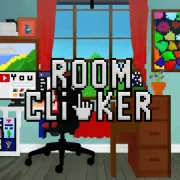
Play Room Clicker online for free and dive into a world of fun! Click around to discover hidden treasures and surprises in each room. Can you find all the secret items and unlock new levels?
It’s a game of exploration and excitement, perfect for curious kids like you. Gather your friends, click away, and see who can complete the rooms the fastest.
Get ready for an adventure that will keep you entertained for hours!
What Is Room Clicker?
Room Clicker is a fun and interactive game developed by Creative Minds Studio, released on March 15, 2023. In this exciting game, players get to design and decorate their own virtual rooms by clicking and earning points. As you progress, you can unlock new furniture, wallpapers, and decorations to make your room unique and stylish.
The game is easy to play and perfect for kids who love creativity and design. With its colorful graphics and simple controls, it offers endless hours of entertainment. Players can also share their room designs with friends and see who can create the coolest space!
Room Clicker Gameplay Mechanics
In this exciting game, you’ll start with a simple room that you can decorate and upgrade. Your main task is to click on various items in the room to earn coins. These coins are essential as they allow you to purchase new furniture, wallpapers, and other cool decorations. As you progress, you’ll unlock more rooms and themes, each with its own unique style and items.
The game encourages creativity by letting you customize your spaces with a wide variety of options. You can mix and match different styles to create the perfect room. Every item you add or upgrade increases the room’s value, which in turn helps you earn more coins with each click.
There are also special events and challenges that pop up, offering bonus rewards and exclusive items. Keep an eye out for these opportunities to maximize your earnings and enhance your rooms even further. As you advance, you’ll discover new levels of interaction, like mini-games that provide extra coins and rare items.
The game is designed to be fun and engaging for kids, with colorful graphics and easy-to-understand controls. Just tap or click to interact with the items, making it accessible for all ages. With every click, you’re one step closer to creating the ultimate room of your dreams!
Play Room Clicker on Any Device
You can play this game directly in your web browser on desktop, laptop, tablet, or mobile.
How to Play Room Clicker: A Beginner’s Guide
Welcome to the exciting world of clicking fun! In this game, your goal is to create the coolest room ever by collecting points and upgrading your items. Follow these simple steps to get started:
- Start Clicking: Begin by clicking on the room to earn points. Each click gives you a little boost, so keep clicking to gather more!
- Upgrade Your Room: Use the points you collect to buy awesome upgrades. These upgrades can make your room look cooler and help you earn points even faster.
- Unlock New Items: As you progress, you’ll unlock new items that you can add to your room. These items not only make your room unique but also increase your point earnings.
- Keep Improving: The more you play, the more you’ll be able to upgrade and enhance your room. Keep clicking and upgrading to reach new levels of fun!
- Have Fun: Remember, the most important part is to have fun and enjoy creating your dream room!
Now that you know the basics, dive in and start clicking your way to an amazing room!
Mastering Room Clicker Controls
To excel in this game, understanding the controls is essential. Here is a comprehensive guide to help you navigate both basic and advanced controls:
- Basic Controls:
- Click: Use the left mouse button to interact with objects and collect items.
- Navigate: Use the arrow keys or WASD keys to move around the room.
- Zoom: Scroll the mouse wheel up or down to zoom in and out for a better view of the room.
- Pause: Press the ‘P’ key to pause the game at any time.
- Advanced Controls:
- Inventory Management: Press ‘I’ to open your inventory, where you can view and manage collected items.
- Quick Access: Assign items to number keys (1-9) for quick access during gameplay.
- Special Abilities: Activate special abilities by pressing ‘Q’ or ‘E’, depending on the ability assigned.
- Map Overview: Press ‘M’ to view a map of the current level, helping you plan your strategy.
Mastering these controls will enhance your gaming experience and efficiency as you progress through the challenges.
Pro Tips to Master Room Clicker
Hey kids! Ready to become a pro at this fun game? Check out these awesome tips to help you click your way to victory!
- Upgrade Wisely: Focus on upgrading items that give you the most clicks per second. This will help you level up faster!
- Watch for Bonuses: Keep an eye out for special bonuses that pop up. They can give you a big boost and help you earn more points.
- Complete Challenges: Don’t skip the challenges! Completing them can unlock cool new items and give you extra rewards.
- Save Your Coins: Sometimes it’s better to save up for a bigger upgrade rather than spending coins on smaller ones. Plan your purchases!
- Use Power-Ups: Power-ups are your best friends. Use them strategically to maximize your clicking power.
- Keep Clicking: The more you click, the more you earn. So keep those fingers moving and watch your room grow!
Now go out there and show everyone what a true clicking master looks like!
Key Features That Make Room Clicker Special
Discover what makes this game stand out and keeps players entertained for hours:
- Interactive Rooms: Explore and interact with different rooms, each filled with unique items and surprises.
- Customization Options: Personalize your rooms with a variety of furniture and decorations to create your perfect space.
- Fun Challenges: Complete exciting tasks and challenges to earn rewards and unlock new levels.
- Engaging Storyline: Follow a captivating story that unfolds as you progress through the game.
- Collectibles: Gather special items and collectibles to showcase your achievements.
- Kid-Friendly Design: Enjoy a colorful and easy-to-navigate interface designed especially for young players.
Play Room Clicker Online for Free
Experience the fun of this engaging game directly in your web browser with the online version. This browser-adapted version allows you to enjoy all the features without any downloads or installations. It is compatible with modern browsers such as Chrome, Firefox, Safari, and Edge. Enjoy seamless gameplay with online leaderboards and achievements, making it easy to compete with friends and track your progress. Dive into the clicking adventure and see how far you can go!
Is Room Clicker Free to Play?
Enjoy playing online without any cost, as this game is completely free to play. There are no hidden fees or in-app purchases to worry about, allowing you to fully immerse yourself in the experience without any financial commitment. All games on our site offer this same level of accessibility, ensuring that you can explore a variety of options without spending a dime. Free play provides not only entertainment but also the opportunity to try different strategies and improve your skills without any pressure. Dive into the fun and enjoy the benefits of free gaming today!
Play Room Clicker Unblocked
Q: Can I play it unblocked?
A: Yes, play Room Clicker Unblocked on bearclicker.io. Whether you’re at school, at work, or on a break—you can play without any restrictions.
Q: Are there any benefits to playing the unblocked version?
A: Enjoy seamless access with no interruptions, ensuring a smooth gaming experience regardless of your location.
Room Clicker on GitHub
No need to search on GitHub, our version works on all devices at school or work. Competitors often highlight their GitHub repositories for open-source collaboration and version control, ensuring users can contribute and track changes seamlessly. Our solution offers similar benefits, providing an efficient and accessible experience without needing to navigate external repositories.
Download Room Clicker (PC, iOS, Android)
Many fans enjoy downloading it for an even smoother experience. Here’s how:
- Android: Open the Google Play Store and tap Install.
- iOS: Open the App Store on your iPhone or iPad and tap Get.
- Room Clicker APK: Android users who can’t use Google Play can find and download the APK from trusted sites to install offline.
- PC Steam: If you like playing on a computer, download the game for free via Steam and enjoy a bigger screen and controller support.
Room Clicker Extension
Experience the convenience and enhanced gameplay of our Chrome extension. With this extension, you can enjoy instant access to your favorite game directly from your browser. The seamless integration allows for quick play sessions without the need for additional downloads or installations.
Our competitors also highlight the benefits of browser extensions, such as improved accessibility and the ability to play offline. While some extensions offer offline modes, our primary focus remains on providing an uninterrupted online experience. Discover the ease and efficiency of gaming with our extension today.
Download the Chrome extension now and elevate your gaming experience.
Similar games to Room Clicker
If you enjoyed Room Clicker, you might also like these similar games:
FAQs about Room Clicker
Is Room Clicker free to play?
Yes, it is 100% free to play. You can enjoy it without any cost.
Can I play Room Clicker at school?
Yes, you can play it at school if it’s unblocked on your school’s network.
Does Room Clicker work on mobile/phone?
Yes, it works on mobile phones. You can play it on both Android and iOS devices.
Do I need to download Room Clicker?
No, you do not need to download anything. It can be played directly in your web browser.
Can I play Room Clicker on Chromebook?
Yes, you can play it on a Chromebook using a web browser.
Is there a multiplayer mode in the game?
No, there is no multiplayer mode. It is a single-player game.
Are there any ads in the game?
Yes, there are some ads. They help keep the game free for everyone.
Is there a way to save my progress?
No, progress is not saved. Each session starts fresh when you open the game again.
Is the game suitable for all ages?
Yes, it is suitable for all ages. It’s designed to be fun and safe for kids.
Can I play without an internet connection?
No, an internet connection is required to play. The game runs online.
Does the game have sound effects?
Yes, it has sound effects. You can adjust or mute them in the settings.
Conclusion
Room Clicker is a delightful and engaging game that offers endless fun for kids. Its simple yet captivating mechanics make it easy to dive into, while the colorful graphics and rewarding progress keep players coming back for more. As you click your way to a dream room, you’ll discover just how exciting it is to unlock new items and upgrades.
Encourage your friends to join in the fun and see who can create the most amazing room! Room Clicker is not just a game; it’s a creative adventure that sparks imagination and joy. So why wait? Jump online and start clicking your way to the ultimate room today!